
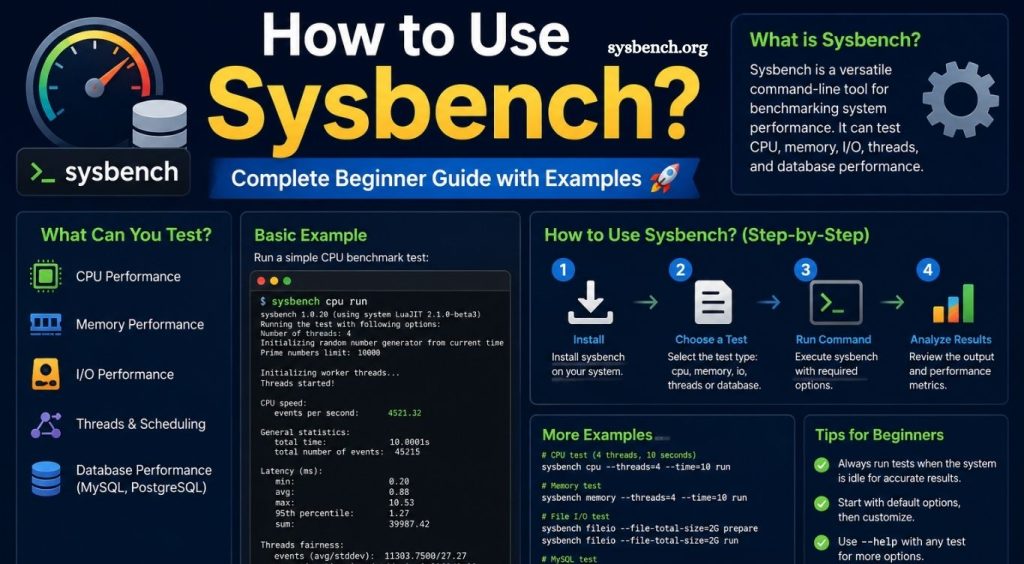
Sysbench stands among the most trusted benchmarking tools for database administrators, system engineers, developers, and Linux professionals. Performance testing plays a critical role in identifying hardware limitations, measuring database efficiency, and validating server stability before production deployment. Sysbench provides a lightweight yet powerful framework for testing CPU performance, memory speed, disk input and output, threading behavior, and database workloads through simple command-line operations.
Learning how to use Sysbench helps beginners understand system capabilities while giving experienced administrators reliable performance metrics for optimization decisions. Whether the goal involves comparing servers, evaluating hardware upgrades, or stress-testing databases, Sysbench offers consistent and repeatable benchmarking methods. This guide explains installation, basic usage, common test scenarios, practical examples, and performance interpretation through clear explanations suitable for every skill level.
What Is Sysbench?
Sysbench represents an open-source benchmarking utility designed for evaluating computer system performance under different workloads. Originally developed for database benchmarking, the tool has evolved into a comprehensive solution capable of testing processors, memory subsystems, storage devices, thread management, and relational databases such as MySQL and MariaDB.
Read More: How to Install Sysbench on Ubuntu Step-by-Step?
Unlike complex enterprise benchmarking software, Sysbench remains lightweight, easy to install, and simple enough for beginners while offering advanced customization for professional environments.
Why Use Sysbench?
System performance affects application responsiveness, database efficiency, virtualization stability, and overall user experience. Sysbench provides measurable data instead of assumptions, allowing administrators to make informed infrastructure decisions.
Performance testing with Sysbench helps identify processing bottlenecks, evaluate storage speed, compare hardware configurations, validate cloud server performance, measure database throughput, and confirm optimization improvements after configuration changes.
Installing Sysbench
Installation depends on the operating system distribution.
Ubuntu and Debian systems support installation through the package manager.
- sudo apt update
- sudo apt install sysbench
CentOS and Rocky Linux users can install Sysbench after enabling the appropriate repositories.
- sudo dnf install sysbench
After installation, verify availability.
- sysbench –version
A successful installation displays the installed version.
Understanding Sysbench Syntax
Most commands follow a simple structure.
- sysbench [test] [options] run
Each command contains three main parts. The first part specifies the benchmark type, the second defines testing parameters, and the final keyword starts execution.
Running a CPU Benchmark
CPU benchmarking measures processor calculation capability using prime number calculations.
Example:
- sysbench cpu run
Default execution performs calculations using predefined settings before generating performance statistics.
Customizing the maximum prime value increases workload intensity.
- sysbench cpu –cpu-max-prime=50000 run
Higher values require additional processing time, creating a more demanding benchmark.
Understanding CPU Benchmark Results
- After completion, Sysbench displays multiple performance metrics.
- Execution time indicates total benchmark duration.
- Events per second represent processing efficiency throughout testing.
- Latency values measure response time for individual operations.
- Thread statistics reveal workload distribution across processor threads.
Higher event rates combined with lower latency generally indicate stronger CPU performance.
Running a Memory Benchmark
Memory benchmarking evaluates RAM read and write performance.
Execute a basic memory test.
- sysbench memory run
Sysbench reports transfer speed measured in megabytes per second, along with total operations completed during execution.
Testing larger memory blocks provides additional insights.
- sysbench memory –memory-block-size=1M run
Different block sizes simulate various application workloads.
Running a File I/O Benchmark
Storage performance directly affects databases, virtual machines, file servers, and enterprise applications.
Prepare testing files before execution.
- sysbench fileio prepare
Run a random read benchmark.
- sysbench fileio –file-test-mode=rndrd run
Execute random write testing.
- sysbench fileio –file-test-mode=rndwr run
Mixed workloads simulate real-world storage activity.
- sysbench fileio –file-test-mode=rndrw run
Remove generated testing files after completion.
- sysbench fileio cleanup
Cleaning temporary files prevents unnecessary disk space consumption.
Running a Thread Benchmark
Thread benchmarks evaluate operating system scheduling efficiency under concurrent workloads.
Run a basic thread benchmark.
- sysbench threads run
Increase workload complexity.
- sysbench threads –threads=16 run
Results demonstrate thread synchronization efficiency under increasing concurrency levels.
Database Benchmarking Using Sysbench
Database administrators frequently use Sysbench for MySQL and MariaDB performance evaluation.
Prepare database tables before testing.
- sysbench oltp_read_write prepare
Execute read and write workload testing.
- sysbench oltp_read_write run
Remove generated benchmark tables afterward.
- sysbench oltp_read_write cleanup
Database benchmarks reveal transaction throughput, query latency, connection scalability, and overall database responsiveness under sustained workloads.
Common Sysbench Options
Sysbench includes numerous parameters for workload customization.
- Thread count controls concurrent execution.
- Execution time defines benchmark duration.
- Report intervals provide periodic performance updates.
- Memory block size adjusts transfer volume.
- File size modifies storage benchmark capacity.
- Maximum prime value controls CPU workload intensity.
Combining these options creates benchmarks closely matching production environments.
Practical Example
Consider two Linux servers with identical software configurations but different processor models.
- Running identical CPU benchmarks on both systems allows direct comparison.
- sysbench cpu –threads=8 –cpu-max-prime=100000 run
Server A may complete calculations faster while producing higher event rates and lower latency. Those results demonstrate greater computational capability under identical testing conditions.
Applying similar methodology across memory, storage, and database benchmarks provides comprehensive performance comparisons before selecting hardware for production deployment.
Tips for Accurate Benchmark Results
Reliable benchmarking requires consistent testing conditions. Close unnecessary background applications before execution to reduce resource interference. Repeat each benchmark several times because single executions occasionally produce inconsistent measurements. Compare average values instead of relying upon isolated results. Perform identical workloads across every tested system to ensure meaningful comparisons.
Monitoring processor utilization, memory consumption, and storage activity during benchmarking also improves result interpretation and helps identify unexpected performance limitations.
Common Beginner Mistakes
Many beginners execute benchmarks without understanding workload parameters, leading to misleading conclusions. Others compare results collected under different configurations, making performance comparisons unreliable.
Skipping preparation steps during file or database benchmarks often generates errors. Ignoring cleanup commands leaves unnecessary temporary files occupying storage space. Another common mistake involves interpreting benchmark numbers without considering hardware specifications, virtualization overhead, or operating system activity.
Conclusion
Sysbench provides an efficient, flexible, and reliable solution for benchmarking Linux systems and database environments. Simple command syntax, lightweight design, and extensive workload customization make the tool suitable for beginners and experienced professionals alike. CPU, memory, storage, threading, and database benchmarks generate valuable insights that support performance tuning, infrastructure planning, hardware evaluation, and production readiness.