
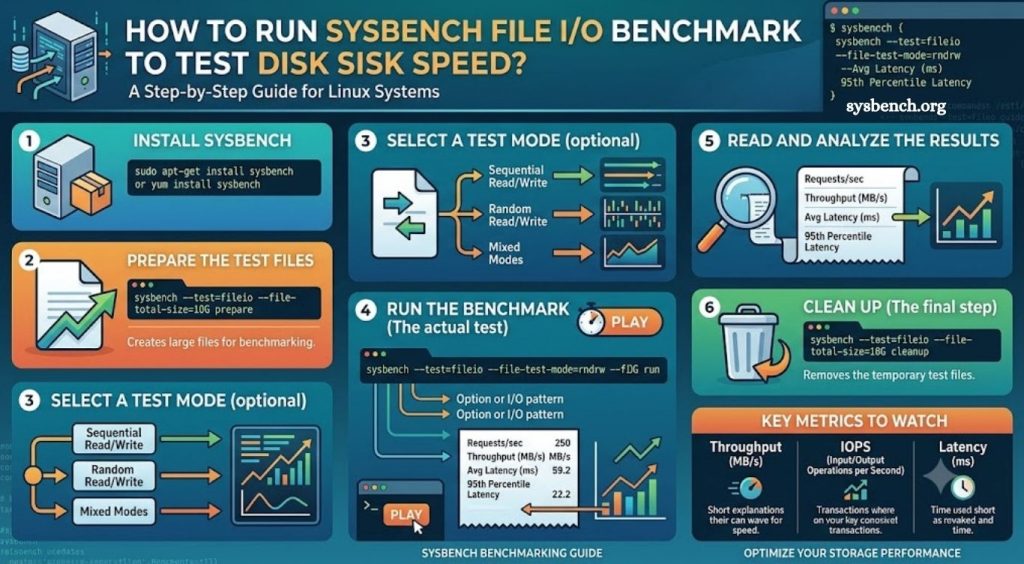
Disk performance plays a critical role in overall system responsiveness. Every application depends on storage for reading, writing, and retrieving data. Slow disks increase application latency, extend backup duration, reduce database performance, and create bottlenecks that affect user experience. Measuring storage performance helps administrators identify limitations before they become serious operational problems.
Sysbench provides a practical way to evaluate disk performance through File I/O benchmarking. The tool generates repeatable workloads that simulate real storage operations, allowing administrators, developers, and infrastructure engineers to compare storage devices, verify server performance, and validate hardware upgrades. Reliable benchmark results provide valuable insight for capacity planning, virtualization, database optimization, and infrastructure testing.
Understanding the Sysbench File I/O Benchmark
Sysbench is an open-source benchmarking utility designed for Linux systems. Although many users recognize Sysbench for CPU and database testing, its File I/O benchmark is equally valuable for measuring storage performance.
The File I/O test creates test files, performs controlled read and write operations, and records performance statistics throughout execution. These statistics reveal how efficiently a storage device handles sequential and random workloads under different conditions.
Read More: How to Test RAM Performance Using Sysbench Memory Benchmark?
Unlike simple file copy operations, Sysbench produces consistent workloads that allow meaningful comparisons between servers, virtual machines, SSDs, NVMe drives, HDDs, and cloud storage.
Why Test Disk Speed with Sysbench?
Storage benchmarking helps identify real-world performance characteristics instead of relying on manufacturer specifications. Since workloads vary across applications, testing disks under controlled conditions provides a more realistic understanding of storage capabilities.
Database servers benefit from strong random read and write performance, while backup systems rely heavily on sequential throughput. Virtualization hosts require balanced I/O performance across multiple workloads. Sysbench helps reveal strengths and weaknesses before production deployment.
Benchmarking also helps confirm hardware upgrades, compare storage configurations, troubleshoot slow applications, and monitor performance changes after operating system updates.
Install Sysbench
Most Linux distributions include Sysbench through their package repositories.
Ubuntu and Debian systems can install Sysbench with:
- sudo apt update
- sudo apt install sysbench
CentOS, Rocky Linux, AlmaLinux, and RHEL systems can install it using:
- sudo dnf install sysbench
Older Enterprise Linux releases may use:
- sudo yum install sysbench
Verify installation by checking the installed version:
- sysbench –version
A successful installation returns the current Sysbench version installed on the system.
Prepare File I/O Test Files
Before executing any benchmark, Sysbench must create test files. This preparation stage generates files used during benchmarking.
The following command creates approximately 5 GB of test data:
- sysbench fileio \
- –file-total-size=5G \
- prepare
Adjust the total file size based on available storage space. Larger datasets often produce more representative benchmark results because they reduce cache influence.
Preparation may require several minutes depending on storage performance.
Run Sequential Read Benchmark
Sequential reads measure performance when large blocks of data are read continuously from storage.
Execute the benchmark with:
- sysbench fileio \
- –file-test-mode=seqrd \
- –time=60 \
- –threads=4 \
- run
This command performs sequential reading for sixty seconds using four worker threads.
After completion, Sysbench displays important metrics including transfer rate, operations per second, average latency, and execution time.
Higher throughput combined with lower latency generally indicates better sequential read performance.
Run Sequential Write Benchmark
Sequential write testing measures continuous write performance across large files.
Run the benchmark with:
- sysbench fileio \
- –file-test-mode=seqwr \
- –time=60 \
- –threads=4 \
- run
Sequential write performance significantly influences backup operations, media processing, and large file transfers.
Storage devices equipped with faster controllers and larger caches usually achieve stronger sequential write speeds.
Run Random Read Benchmark
Random read workloads represent many real production environments, particularly database servers and virtualization platforms.
Execute random read testing with:
- sysbench fileio \
- –file-test-mode=rndrd \
- –time=60 \
- –threads=4 \
- run
Random access forces storage devices to retrieve data from multiple locations instead of reading consecutive blocks.
Solid-state drives generally outperform traditional hard drives during random read workloads because flash storage eliminates mechanical seek delays.
Run Random Write Benchmark
Random write testing evaluates storage behavior under scattered write operations.
Use:
- sysbench fileio \
- –file-test-mode=rndwr \
- –time=60 \
- –threads=4 \
- run
This benchmark closely resembles workloads generated by transactional databases, logging services, and virtual machine environments.
Low latency and high IOPS indicate stronger random write capability.
Run Mixed Random Read and Write Benchmark
Many production servers perform simultaneous reading and writing. Mixed testing provides a balanced view of storage performance.
Execute the benchmark with:
- sysbench fileio \
- –file-test-mode=rndrw \
- –time=60 \
- –threads=4 \
- run
Mixed workloads better represent everyday server activity because applications rarely perform only reading or only writing.
This benchmark often reveals storage limitations hidden during single-operation testing.
Understanding Benchmark Results
Sysbench reports several important performance metrics after every benchmark.
Throughput measures the amount of data transferred every second. Higher throughput usually benefits workloads involving large files, backups, and streaming applications.
IOPS, or Input/Output Operations Per Second, reflects how many storage operations complete each second. Database servers and virtualization platforms often depend more heavily on IOPS than raw transfer speed.
Latency measures the delay required for each storage operation. Lower latency produces faster application response times and smoother system performance.
Average latency provides an overall view of storage responsiveness, while maximum latency highlights occasional performance spikes that may affect demanding applications.
Thread statistics reveal workload distribution across worker threads and help identify scaling efficiency during concurrent operations.
- Remove Benchmark Files
After testing completes, remove generated files to recover storage space.
Execute:
- sysbench fileio cleanup
Cleanup deletes every test file created during the preparation stage without affecting unrelated system files.
Tips for Accurate Disk Benchmarks
Benchmark accuracy depends heavily on consistent testing conditions. Running benchmarks on an idle system reduces interference from background processes and produces more reliable results. Repeating each test several times helps identify abnormal results and improves confidence in measured performance.
Testing with larger datasets minimizes operating system cache effects and provides measurements closer to real production workloads. Comparing results across identical configurations also improves consistency when evaluating storage upgrades or different server platforms.
Recording benchmark results over time creates a valuable performance history that simplifies troubleshooting and validates infrastructure improvements after hardware replacements or software updates.
Conclusion
Sysbench File I/O benchmarking offers a reliable method for measuring disk performance across Linux systems. Sequential, random, and mixed workload tests provide valuable insight into storage behavior under different operating conditions. Understanding throughput, IOPS, and latency enables informed decisions regarding hardware selection, infrastructure optimization, and application performance tuning.