
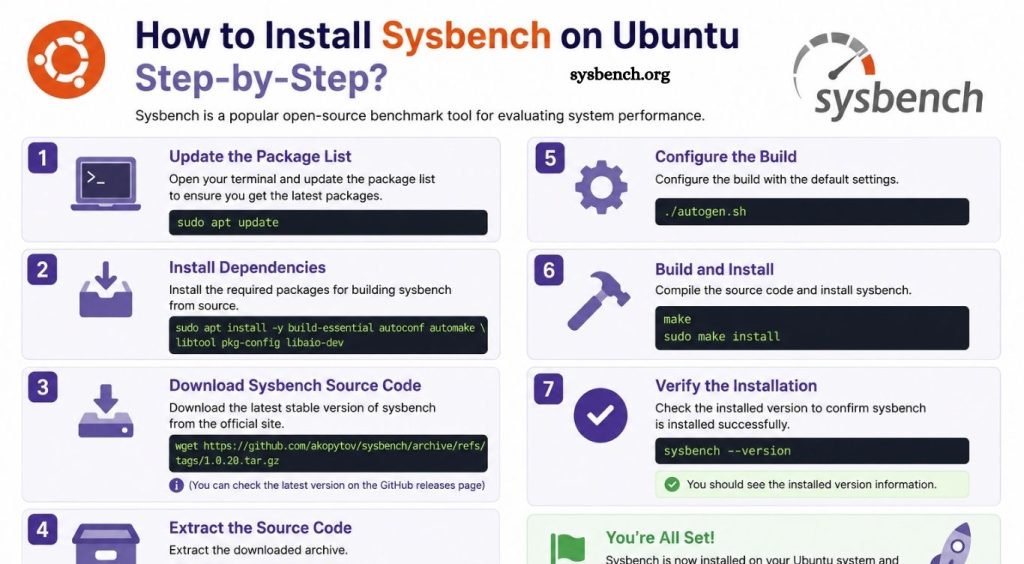
Sysbench stands among the most trusted benchmarking tools for Linux environments. System administrators, developers, and database professionals rely on this lightweight utility to evaluate CPU performance, memory speed, disk I/O, thread efficiency, and database workloads. Whether you manage a personal server or maintain enterprise infrastructure, Sysbench delivers valuable performance insights through simple commands and reliable testing methods.
Ubuntu users appreciate Sysbench because installation requires minimal effort while offering powerful benchmarking capabilities. After installation, users can quickly perform stress tests, identify performance bottlenecks, compare hardware configurations, and monitor system improvements. This guide explains every installation step clearly, ensuring beginners and experienced Linux users can complete the process successfully.
What Is Sysbench?
Sysbench is an open-source command-line benchmarking application designed for Linux systems. It measures several system resources, helping users understand overall server performance before deploying applications or databases.
Sysbench supports benchmarking for:
- CPU performance
- Memory throughput
- File Input/Output (I/O)
- Thread performance
- Database performance (MySQL and MariaDB)
Because of its flexibility, Sysbench has become a popular choice for Linux administrators and DevOps professionals.
Read More: How to Download the Latest Version of Sysbench for Linux & Windows?
Why Install Sysbench on Ubuntu?
Installing Sysbench provides several advantages, including:
- Measure overall system performance
- Benchmark database servers
- Compare hardware upgrades
- Detect performance bottlenecks
- Validate cloud server performance
- Perform stress testing before production deployment
These capabilities help maintain stable and optimized server environments.
Prerequisites
Before installing Sysbench, ensure the following requirements are met:
- Ubuntu 20.04, Ubuntu 22.04, Ubuntu 24.04, or newer
- User account with sudo privileges
- Stable internet connection
Updated package repository
Sysbench stands among the most trusted benchmarking tools for Linux environments. System administrators, developers, and database professionals rely on this lightweight utility to evaluate CPU performance, memory speed, disk I/O, thread efficiency, and database workloads. Whether you manage a personal server or maintain enterprise infrastructure, Sysbench delivers valuable performance insights through simple commands and reliable testing methods.
Ubuntu users appreciate Sysbench because installation requires minimal effort while offering powerful benchmarking capabilities. After installation, users can quickly perform stress tests, identify performance bottlenecks, compare hardware configurations, and monitor system improvements. This guide explains every installation step clearly, ensuring beginners and experienced Linux users can complete the process successfully.
What Is Sysbench?
Sysbench is an open-source command-line benchmarking application designed for Linux systems. It measures several system resources, helping users understand overall server performance before deploying applications or databases.
Sysbench supports benchmarking for:
- CPU performance
- Memory throughput
- File Input/Output (I/O)
- Thread performance
- Database performance (MySQL and MariaDB)
Because of its flexibility, Sysbench has become a popular choice for Linux administrators and DevOps professionals.
Why Install Sysbench on Ubuntu?
Installing Sysbench provides several advantages, including:
- Measure overall system performance
- Benchmark database servers
- Compare hardware upgrades
- Detect performance bottlenecks
- Validate cloud server performance
- Perform stress testing before production deployment
These capabilities help maintain stable and optimized server environments.
Prerequisites
Before installing Sysbench, ensure the following requirements are met:
- Ubuntu 20.04, Ubuntu 22.04, Ubuntu 24.04, or newer
- User account with sudo privileges
- Stable internet connection
- Updated package repository
Sysbench stands among the most trusted benchmarking tools for Linux environments. System administrators, developers, and database professionals rely on this lightweight utility to evaluate CPU performance, memory speed, disk I/O, thread efficiency, and database workloads. Whether you manage a personal server or maintain enterprise infrastructure, Sysbench delivers valuable performance insights through simple commands and reliable testing methods.
Ubuntu users appreciate Sysbench because installation requires minimal effort while offering powerful benchmarking capabilities. After installation, users can quickly perform stress tests, identify performance bottlenecks, compare hardware configurations, and monitor system improvements. This guide explains every installation step clearly, ensuring beginners and experienced Linux users can complete the process successfully.
What Is Sysbench?
Sysbench is an open-source command-line benchmarking application designed for Linux systems. It measures several system resources, helping users understand overall server performance before deploying applications or databases.
Sysbench supports benchmarking for:
- CPU performance
- Memory throughput
- File Input/Output (I/O)
- Thread performance
- Database performance (MySQL and MariaDB)
Because of its flexibility, Sysbench has become a popular choice for Linux administrators and DevOps professionals.
Why Install Sysbench on Ubuntu?
Installing Sysbench provides several advantages, including:
- Measure overall system performance
- Benchmark database servers
- Compare hardware upgrades
- Detect performance bottlenecks
- Validate cloud server performance
- Perform stress testing before production deployment
These capabilities help maintain stable and optimized server environments.
Prerequisites
Before installing Sysbench, ensure the following requirements are met:
- Ubuntu 20.04, Ubuntu 22.04, Ubuntu 24.04, or newer
- User account with sudo privileges
- Stable internet connection
- Updated package repository
Step 1: Update Ubuntu Package Repository
Begin by updating the package index.
- sudo apt update
Updating ensures Ubuntu downloads the latest package information before installation.
Step 2: Upgrade Installed Packages (Optional)
Although optional, upgrading installed packages helps maintain compatibility.
- sudo apt upgrade -y
Wait until the upgrade process finishes before continuing.
Step 3: Install Sysbench
Ubuntu includes Sysbench within the official repository.
Run:
- sudo apt install sysbench -y
Ubuntu downloads and installs every required dependency automatically.
Step 4: Verify Installation
After installation, verify the installed version.
- sysbench –version
Example output:
- sysbench 1.0.20
Successful output confirms proper installation.
Step 5: Display Available Benchmark Tests
View every supported benchmark by running:
- sysbench –help
Available tests typically include:
- cpu
- memory
- fileio
- threads
- mutex
This command also displays numerous configuration options.
Basic Sysbench Examples
CPU Benchmark
Run a CPU benchmark using 10,000 calculations.
- sysbench cpu –cpu-max-prime=10000 run
Output displays:
- Events processed
- Execution time
- Average latency
- Total operations
- Memory Benchmark
Measure memory performance.
- sysbench memory run
Results include:
- Transfer speed
- Operations completed
- Memory throughput
- File I/O Benchmark
Prepare testing files.
- sysbench fileio prepare
Run benchmark.
- sysbench fileio –file-test-mode=rndrw run
Clean temporary files afterward.
- sysbench fileio cleanup
Thread Benchmark
Evaluate thread scheduling performance.
- sysbench threads run
Results provide useful thread execution statistics.
How to Remove Sysbench
Remove Sysbench completely if no longer required.
- sudo apt remove sysbench -y
Delete unnecessary dependencies.
- sudo apt autoremove -y
Common Installation Issues
Package Not Found
Refresh package information.
- sudo apt update
Retry installation afterward.
Permission Denied
Ensure commands run with administrative privileges.
- sudo apt install sysbench
Command Not Found
Verify installation.
- sysbench –version
If unavailable, reinstall Sysbench using the installation command.
Best Practices
Follow these recommendations for accurate benchmarking:
- Close unnecessary applications before testing.
- Run multiple benchmark sessions.
- Compare average results instead of single runs.
- Perform tests under similar system conditions.
- Monitor CPU temperature during stress testing.
- Record benchmark results for future comparison.
These practices improve benchmarking accuracy and consistency.
Conclusion
Installing Sysbench on Ubuntu requires only a few straightforward commands, making it one of the easiest benchmarking tools to deploy on Linux servers. After installation, users can benchmark CPU performance, memory speed, file I/O, thread efficiency, and database workloads with reliable and repeatable results.