
Modern applications depend on reliable processor performance to deliver fast response times, stable workloads, and consistent user experience. System administrators, developers, DevOps engineers, and infrastructure teams often measure CPU capability before deploying production environments, optimizing virtual machines, or comparing server hardware. A dependable benchmarking process provides valuable insight into processor efficiency under controlled workloads, helping identify strengths, limitations, and potential performance bottlenecks.
Sysbench has become a trusted benchmarking utility because of its simplicity, flexibility, and accuracy. Instead of relying on assumptions, professionals use Sysbench CPU benchmark tests to generate measurable results that support capacity planning, hardware validation, and performance tuning. Understanding how to run Sysbench CPU benchmark for performance testing allows organizations to evaluate processor performance with confidence while creating a reliable foundation for future infrastructure decisions.
Understanding Sysbench CPU Benchmark
Sysbench is an open-source benchmarking and workload generation tool designed for Linux and Unix-like operating systems. Although it supports several testing modules, including memory, file I/O, database, and threading, the CPU benchmark remains one of its most frequently used features.
Read More: How to Use Sysbench? Complete Beginner’s Guide with Examples
During a CPU benchmark, Sysbench performs mathematical calculations by generating prime numbers. Every calculation consumes processor resources, allowing administrators to measure computational capability under repeatable conditions. Because every execution follows identical parameters, benchmark results remain suitable for hardware comparison, virtualization analysis, cloud instance evaluation, and performance optimization.
Why CPU Benchmarking Matters
Processor performance directly affects application responsiveness, database execution speed, software compilation, virtualization efficiency, and container orchestration. Even servers with identical specifications may produce different benchmark scores because of firmware settings, thermal conditions, processor architecture, virtualization overhead, or background services.
Running a Sysbench CPU benchmark helps verify expected hardware performance before production deployment. Benchmark data also assists performance engineers during hardware upgrades, cloud migration projects, infrastructure validation, and operating system optimization. Consistent benchmarking creates reliable historical data that simplifies future comparisons after software updates or hardware modifications.
Installing Sysbench
Before executing a benchmark, Sysbench must be installed on the target system. Most Linux distributions include Sysbench within official package repositories, making installation straightforward. After installation, confirming successful deployment ensures every benchmark command executes without interruption.
Keeping Sysbench updated provides compatibility improvements, bug fixes, and enhanced benchmarking accuracy. Using current software versions also improves consistency when comparing results across multiple environments.
Running a Sysbench CPU Benchmark
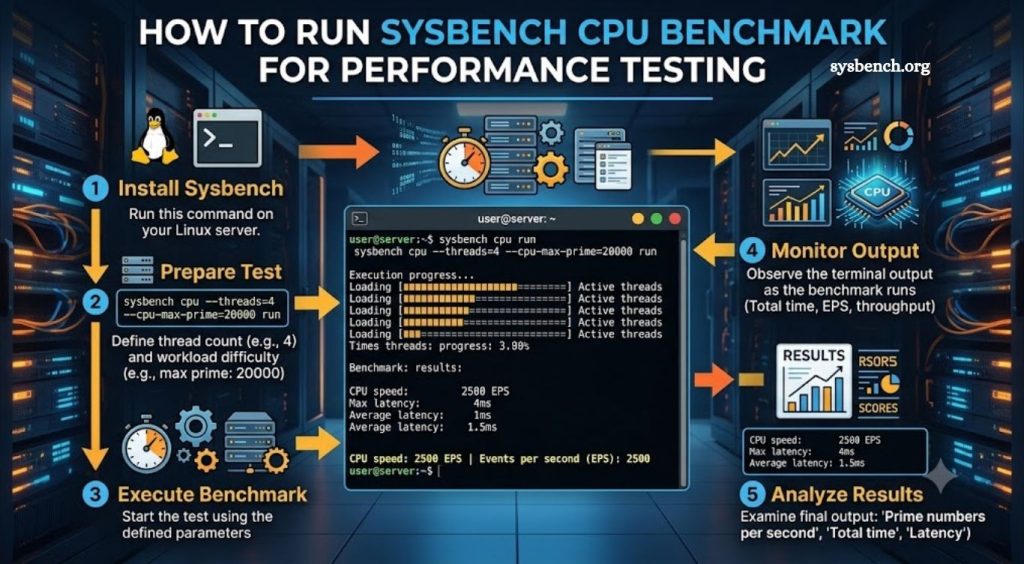
Executing a CPU benchmark requires only a single command. A common example uses the following syntax:
- sysbench cpu –cpu-max-prime=20000 run
This command instructs Sysbench to calculate prime numbers until reaching the specified limit. Once execution finishes, Sysbench generates a detailed performance report containing valuable metrics that describe processor behavior throughout the benchmark.
Benchmark duration depends on processor speed, available cores, workload configuration, and selected parameters. Faster processors complete calculations more quickly, while lower-powered systems naturally require additional time.
Understanding Benchmark Results
After benchmark completion, Sysbench displays several performance statistics that help evaluate CPU capability. Execution time represents the total duration required to complete every calculation. Lower execution times generally indicate stronger processor performance.
The events-per-second metric measures computational throughput during benchmark execution. Higher values demonstrate greater processing capability and improved computational efficiency. Average latency reflects processing speed for individual operations, while maximum latency identifies slower processing intervals that may indicate temporary resource contention or background activity.
Thread statistics reveal workload distribution across available processor resources. Stable thread performance typically suggests balanced CPU utilization and efficient workload scheduling.
Customizing Benchmark Parameters
Sysbench allows flexible benchmark customization for different testing objectives. Increasing the maximum prime number creates a heavier computational workload that places additional demand on processor resources. Longer benchmark durations often provide more representative performance measurements because they reduce temporary fluctuations caused by background system activity.
Thread configuration also plays an important role during benchmarking. Matching thread count with available processor cores helps evaluate multicore scalability. Additional thread testing reveals how processors behave under parallel workloads commonly encountered within production environments.
Carefully selected benchmark parameters improve testing accuracy while producing meaningful comparisons between different hardware platforms.
Improving Benchmark Accuracy
Reliable benchmarking depends upon consistent testing conditions. Closing unnecessary applications before benchmark execution minimizes background resource consumption and improves measurement consistency. Running identical benchmark parameters across every tested system creates fair comparisons regardless of hardware generation.
Thermal conditions also influence benchmark accuracy. Processors experiencing excessive temperatures may reduce operating frequency through thermal throttling, resulting in lower benchmark scores. Maintaining adequate cooling allows processors to sustain expected performance throughout benchmark execution.
Repeating identical benchmarks several times provides additional confidence because average values reduce random variation between individual test runs.
Common Benchmarking Mistakes
Performance testing occasionally produces misleading results because of inconsistent methodology rather than hardware limitations. Running benchmarks alongside resource-intensive applications frequently reduces CPU availability, affecting measured performance. Comparing benchmark scores generated with different Sysbench versions or different workload parameters also creates inaccurate conclusions.
Virtual machines may introduce additional scheduling overhead compared with physical hardware, making direct comparisons inappropriate unless testing environments remain consistent. Power-saving modes, processor frequency scaling, and background operating system services may further influence benchmark outcomes.
Maintaining identical testing procedures across every benchmark session ensures dependable, repeatable performance measurements.
Practical Applications
Organizations frequently use Sysbench CPU benchmarks before deploying enterprise applications, validating dedicated servers, evaluating cloud infrastructure, testing virtualization platforms, and comparing processor generations. Hosting providers also rely upon benchmark results when verifying hardware consistency across server fleets.
Developers benefit from CPU benchmarking while optimizing software compilation environments, continuous integration pipelines, and containerized workloads. Infrastructure teams use historical benchmark records to identify gradual performance degradation resulting from hardware aging, firmware changes, or operating system updates.
Regular benchmarking establishes measurable performance baselines that simplify future troubleshooting and upgrade planning.
Conclusion
Learning how to run Sysbench CPU benchmark for performance testing provides valuable insight into processor capability across physical servers, cloud platforms, virtual machines, and development environments. Simple execution, repeatable workloads, and detailed performance metrics make Sysbench an excellent choice for evaluating computational efficiency under controlled conditions.